News
TikTok Shop's rules for AI images: allowed, but every detail must match the product
Last updated 2026-09-27From Plien Roob — AI model photography for online stores

TikTok Shop Academy has a rules page called “AI-generated content” (เนื้อหาที่สร้างโดย AI) that applies to Thailand and Indonesia. It was created on 26 January 2026 and last edited on 27 August 2026. The short version: you can use AI images and video, but they must match the real product, and you must switch on the AI-generated content label before posting. The page is written mainly for creators and shoppable videos, and doesn't directly address the photos on a product listing.
What TikTok Shop's page says
AI images and video must match the real product, for example in colour, size, material, design, shape and weight. No “after” shots showing results that aren't real, such as smoother skin or hair regrowth.
Don't use AI characters or scenes to stage situations that aren't real in order to push a purchase, such as emotional or emergency scenarios.
In the page's fashion infographic: buttons, zips, embroidery and patterns in AI images must match the real item, no change of fabric (the page's example is chiffon turning into lace), and the size chart must match the real item.
No poses, gestures or camera angles that are sexually lewd or obscene in a way that isn't necessary to promote the product.
No promoting a product with AI images that are mostly stills; there should be a demonstration or someone explaining the product.
Switch on the label under “More options > AI-generated content” before posting. Repeat violations bring heavier penalties.
What your shop should do
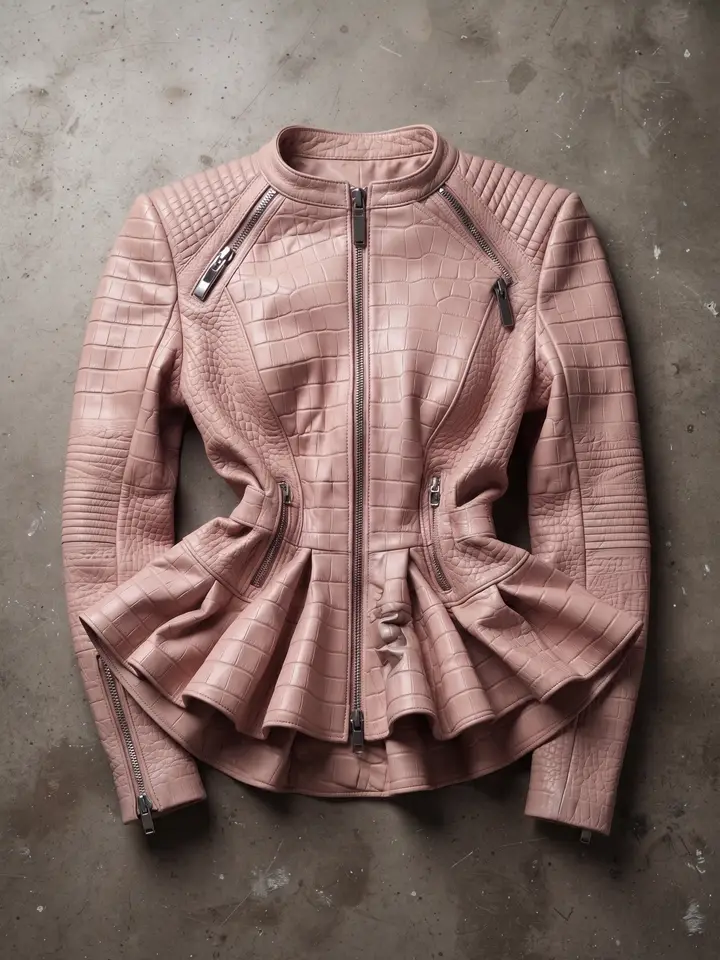 Uploaded
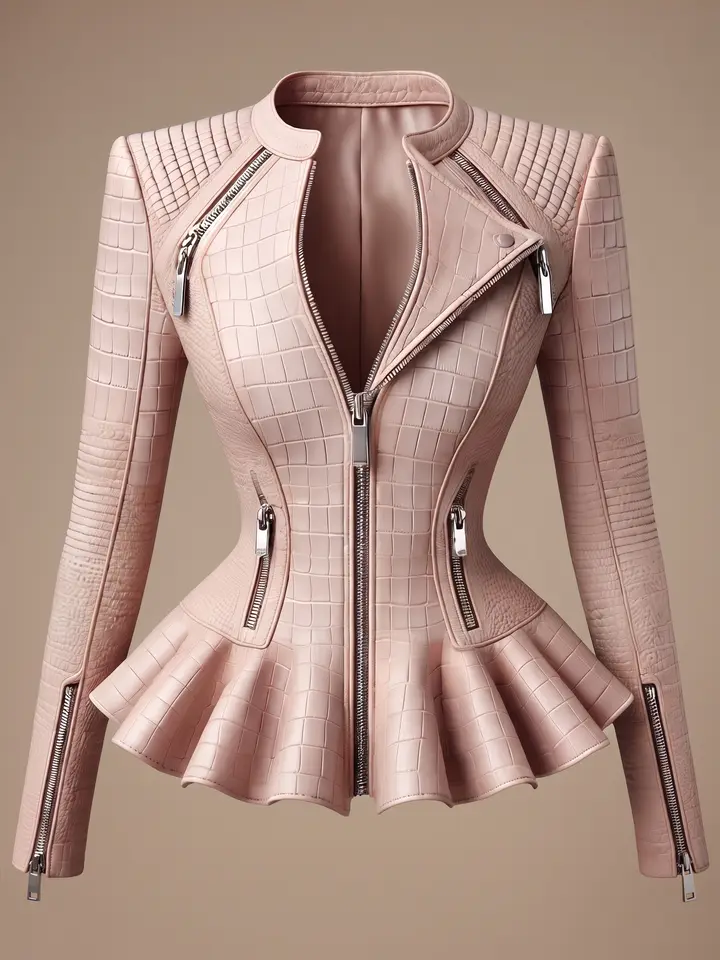 Result
Put the AI image next to the real item and compare them point by point: colour, fabric, buttons, zips, embroidery, pattern, shape and the size chart. If anything doesn't match the real item, don't use the image, whether it was added, is missing or has changed.
If you use AI images in a shoppable video or post, have someone demonstrate or talk through the product. Don't let stills make up most of it.
Switch on the AI-generated content label whenever a video contains AI images or video, before you post.
 Illustration
Ipsos's AI Monitor 2026, covering 32 countries and published on 8 June 2026, found that 85% of Thai respondents believe products and services should be required to disclose when AI is being used, above the global average of 80%, although the question was not about product photos specifically.
If you make images with Plien Roob
Our Product to Model tool instructs the AI to keep the print, lettering and details from your photo, but results can still drift, so zoom in on every image before you list it. The AI-generated content label on TikTok is yours to switch on, every time. This article's header image was also made with AI in our system.
Frequently asked questions
Can I use AI images to sell on TikTok Shop?
Yes, if they match the real product. TikTok Shop Academy's AI-generated content page (Thailand and Indonesia, last edited 27 August 2026) is written mainly for creators and shoppable videos: AI images and video must match the real item, the content shouldn't be mostly AI stills, and the AI-generated content label must be switched on before posting. Photos on a product listing are covered by a separate TikTok Shop page, which makes the seller responsible for AI images matching the real product. This summarises the pages as we read them on 27 September 2026 and is not legal advice.
Where do I switch on the AI label on TikTok?
Switch it on under “More options > AI-generated content” before you post, as set out on TikTok Shop Academy's AI-generated content page, last edited on 27 August 2026. TikTok Shop's content policy, in its version of 16 March 2026, already requires creators to label AI-generated content.

Plien Roob
Ready for your first product photo?
Sources
- TikTok Shop Academy · เนื้อหาที่สร้างโดย AI · 2026-01-26 · updated 2026-08-27
- TikTok Shop Academy · การแสดงข้อมูลเท็จและการใช้ AI ในรายการสินค้า · updated 2026-09-24
- TikTok Shop Academy · นโยบายเนื้อหาของ TikTok Shop · updated 2026-03-16
- Ipsos · Thailand and AI in 2026: Excitement, Optimism and Growing Expectations · 2026-06-08
Photos by Roman Manshin on Unsplash